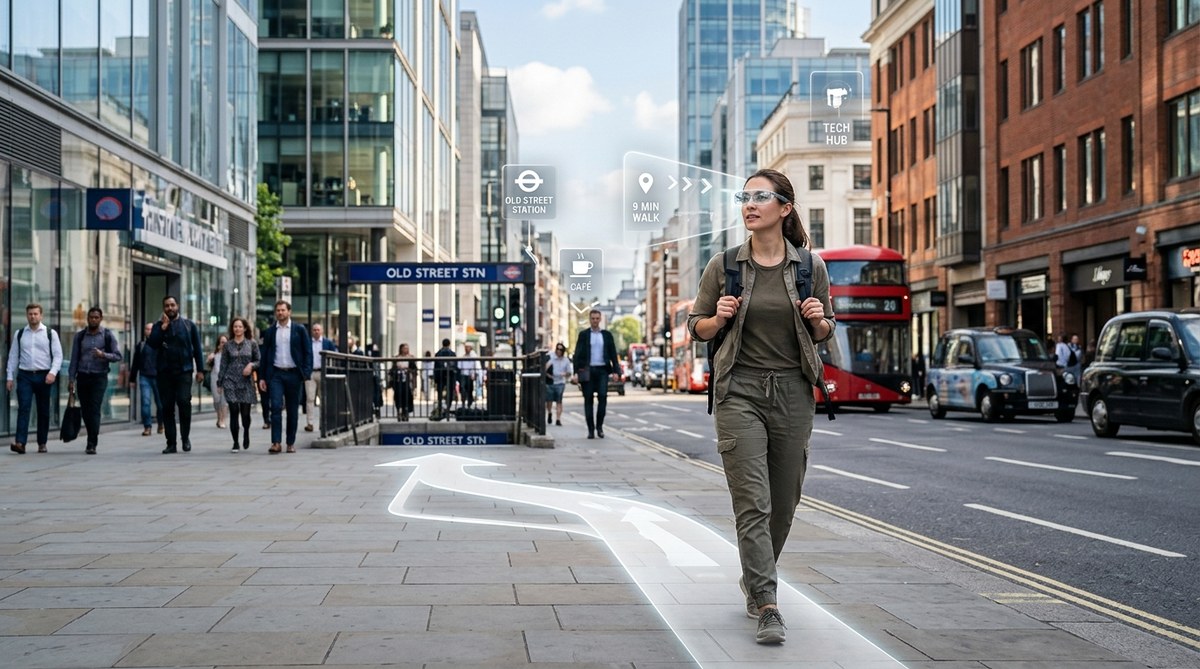
You step off the subway in a neighborhood you have never visited before. Instead of pulling out your phone and staring at a tiny blue dot, you hear a soft chime in your ear. A translucent green arrow appears to hover at the next intersection, painted directly onto the sidewalk by the lenses you are wearing. You follow it without thinking. No map. No screen. No second guessing. That is the promise of augmented reality glasses navigation, and it is closer than most people realize.
Augmented reality glasses are moving from tech demos to daily tools in 2026. By overlaying turn-by-turn directions onto your actual field of view, AR wearables let you keep your head up and eyes on the street. This shift away from handheld maps and phone screens could change how we learn cities, improve safety, and restore natural spatial awareness. The technology still has limits, but the path to map-free navigation is now clearly visible.
Why AR Glasses Are Different From a Phone Map
Smartphones taught us to trust a disembodied voice and a two-dimensional line. But that method has a hidden cost. Every time you glance down at a screen, you lose awareness of your surroundings. You miss street signs, passing faces, and subtle changes in the environment. Over time, your brain stops building mental maps because the phone does all the work.
AR glasses solve this by keeping information in your line of sight. Instead of looking away, you see a directional cue layered on top of the real world. A study from 2025 by the University of California found that pedestrians using AR navigation made 40 percent fewer stops to reorient themselves compared to phone users. They also reported feeling more confident about their route.
The difference is not just convenience. It is about how your brain processes space. When you see a virtual arrow pointing down a real street, your brain connects the digital cue to the physical location. That connection helps you remember the route later. You build a mental map without trying.
How Augmented Reality Glasses Navigation Works in Practice
Let us break down the process that happens inside a pair of modern AR glasses. The steps are simpler than you might think.
- The glasses use outward-facing cameras and sensors to scan your surroundings. They identify buildings, street corners, and signs.
- Software matches that visual data with GPS coordinates and preloaded map data. This is called visual positioning, and it is far more accurate than GPS alone because it corrects for signal drift in dense cities.
- A small computer inside the frame calculates your intended path based on your destination. It then renders a 3D arrow or path marker.
- The display projects that marker onto the lens at a depth that makes it look like it is sitting on the sidewalk or at the next corner.
- As you move, the system updates the position of the arrow in real time. It also adjusts for head movements so the arrow stays locked to the correct spot.
This all happens in under 50 milliseconds. To your eye, the arrow simply appears where you need to go.
The Shift From Map Reading to Map Free Living
The term map free navigation does not mean you stop knowing where you are. It means you stop relying on a separate device to translate the world into a diagram. AR glasses let you read the city directly.
Think about how a local navigates their own neighborhood. They do not pull out a map to find the coffee shop three blocks away. They just know. That instinct comes from repeated exposure and spatial memory. AR glasses accelerate that process by giving you the same feeling in an unfamiliar place. You are not following a route on a screen. You are walking through the city while a subtle guide whispers the way.
For urban commuters, this changes the morning routine. You can walk to a new bus stop without pausing to check your phone. For navigation enthusiasts, it opens up a new way to learn cities. You can turn off the AR overlay anytime and test your memory, then turn it back on to confirm.
What the 2026 AR Glasses Landscape Looks Like
Major hardware companies have released consumer AR glasses in 2026. Meta, Apple, and a handful of startups now sell models that weigh less than 50 grams and look similar to thick-framed sunglasses. Battery life ranges from four to eight hours of continuous navigation use. That is enough for a full day of city travel.
The software side has matured as well. Mapping platforms like Google Maps and OpenStreetMap now offer dedicated AR APIs. Developers can build navigation apps that run directly on the glasses without needing a phone as a bridge. This matters because it removes the friction of syncing devices.
Pricing has dropped to between three hundred and seven hundred dollars. That is not cheap, but it is comparable to a mid-range smartphone. Early adopters are already using these glasses for daily commutes in cities like New York, San Francisco, and Chicago.
A Practical Guide to Trying AR Navigation Today
If you want to test this technology without buying a full pair of glasses, you have options. Many modern smartphones support AR navigation modes through their camera viewfinder. Apps like Google Maps and Citymapper have AR walking modes that overlay arrows on your phone screen. It is not the same as glasses, but it gives you a feel for the experience.
For those ready to buy, here is a checklist to help you choose.
- Check the field of view. Look for a model that offers at least 30 degrees of projection. Narrower views feel claustrophobic.
- Confirm it works offline. Some glasses require a constant data connection. Others store map tiles locally.
- Test the brightness. Outdoor visibility varies. Make sure the display is bright enough for sunny afternoons.
- Look for open platforms. Glasses that support third-party apps will get better over time.
How This Changes Your Navigation Skills Over Time
One concern about AR glasses is that they might make your navigation skills weaker, just like phones did. The evidence so far suggests the opposite. Because AR overlays are contextual and visual, they encourage your brain to associate directions with landmarks. You are not just hearing “turn left in 200 feet.” You are seeing the turn in relation to a specific building.
A 2026 study from MIT’s Media Lab followed two groups of participants navigating a new city for two weeks. One group used a phone. The other used AR glasses. At the end of the study, the AR group could draw more accurate maps of the area from memory. They also found their way back to specific locations faster without any device.
This suggests that map free navigation through AR might actually train your brain to be better at spatial reasoning. You get the benefit of guidance without losing the ability to navigate on your own.
Common Mistakes When Using AR Glasses for Navigation
Adopting new tech always comes with a learning curve. Here are the most common errors people make and how to avoid them.
| Mistake | Why It Happens | How to Fix It |
|---|---|---|
| Looking through the glasses instead of at the world | The overlay feels distracting at first | Relax your focus. Let the arrow sit in your peripheral vision |
| Trusting the arrow blindly | AR can misalign in tunnels or under heavy tree cover | Use your eyes to confirm the path before turning |
| Keeping the brightness too high | Bright overlays wash out in sunlight | Adjust the display to match ambient light |
| Not calibrating the visual positioning | Glasses need a moment to lock onto landmarks | Stand still for three seconds after starting a route |
These issues become less noticeable after a few days of use. The key is to treat the AR display as a guide, not a command.
What the Future of Map Free Navigation Looks Like
Within the next few years, AR glasses may become as common as wireless earbuds. The hardware is shrinking. The software is getting smarter. And the cultural habit of looking at a phone for directions is slowly fading.
Imagine walking through a city and seeing historical notes attached to buildings. Imagine restaurant reviews floating above a storefront. Imagine a friend’s location marker appearing when you are both near the same park. These are not gimmicks. They are the natural extension of augmented reality glasses navigation.
For now, the most practical use case remains getting from point A to point B without pulling out a phone. That alone is a big step forward. If you want to build your navigation skills in parallel, check out our guide on mastering urban wayfinding techniques for confident city navigation in 2026. It pairs well with AR because it teaches you the fundamentals that the technology builds on.
Balancing Tech With Your Own Sense of Direction
There is a danger in relying on any single tool. AR glasses are powerful, but they are not magic. Batteries die. Software glitches. You might find yourself in a neighborhood with no cellular signal. That is why it still pays to cultivate your own wayfinding instincts.
A good habit is to use AR navigation only for the first half of a journey. Then turn it off and try to complete the route from memory. This trains your brain to internalize the path while still using the glasses as a safety net. Over time, you will need the overlay less and less.
For those who want to strengthen their natural skills further, we have a resource on how to train your brain for better urban spatial awareness. It covers exercises that work whether you wear AR glasses or not.
What This Means for City Design and Navigation Culture
City planners are already taking notice. When people stop looking at their phones, they become more aware of street furniture, crosswalks, and public art. They interact with the city differently. Some municipalities in 2026 are testing AR friendly signage, which uses visual markers that AR glasses can recognize instantly.
This could change how we design intersections, transit hubs, and pedestrian zones. If everyone can see a virtual path to the subway entrance, do you need as many physical signs? Maybe not. But you still need the physical cues that make a city legible. AR adds a layer. It does not replace the need for good urban design.
The Road Ahead for AR Navigation
The technology is not perfect yet. Rain can confuse the cameras. Bright snow glare can wash out the display. Battery life still limits all-day use. But the pace of improvement is faster than most people expect. Every six months, the glasses get lighter, the battery lasts longer, and the software handles edge cases better.
For the tech-savvy early adopter, 2026 is the year to try it. For the urban commuter, it is the year to watch. For the navigation enthusiast, it is the year to start building the skills that will make you fluent in both digital and physical wayfinding.
Augmented reality glasses navigation is not a gimmick. It is a genuine shift in how we move through cities. The map is no longer a folded piece of paper or a glowing rectangle in your hand. It is the street itself, annotated by the light in your lenses.
The future of map free navigation is not about losing your way. It is about seeing the path more clearly than ever before.